
User management
User management portal
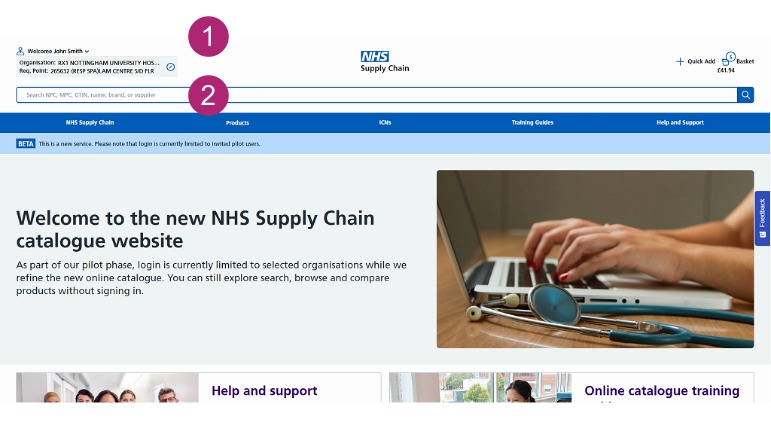
Accessing your organisation
To create and edit users, you will need to have an Admin role.
- Login to your account.
- Select the box containing your current organisation.
Choosing the organisation
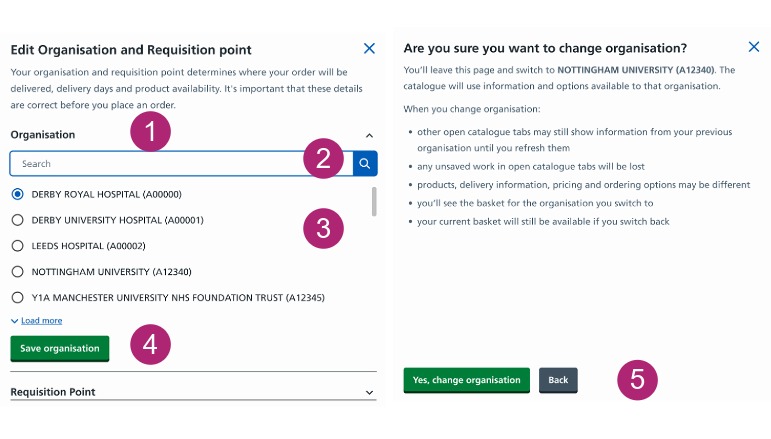
Before creating a user, you must select the organisation you want to create the user for from the options available to you.
You can only create a user for one organisation. If a user needs access to more than one organisation, email digital.commerce@supplychain.nhs.uk
- Click the Organisation drop-down to expand the field.
- The search bar can be used to find the correct organisation.
- Select the required organisation.
- Click Save organisation.
- Click Yes, change organisation to proceed.
Adding users
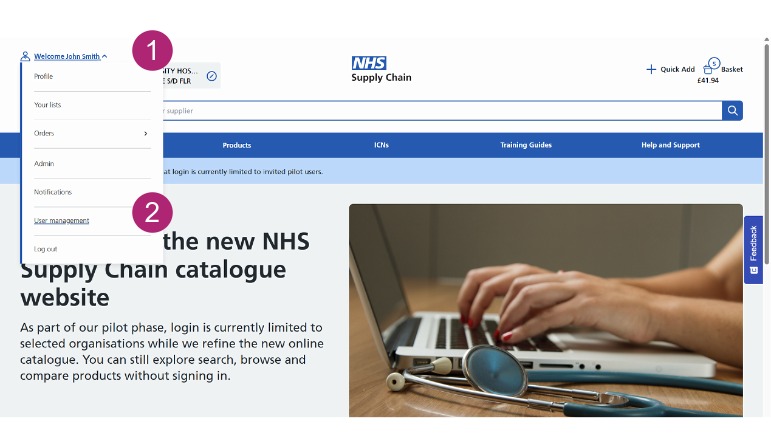
- Login to your account and select the drop down next to your name.
- Select User management.
User roles and administrator access
Within the account setup there is a link where you can view all available user roles, including a description of each role and the permissions assigned to it.
Administrator accounts cannot be created online.
If you need to create an administrator, contact your ICS Manager or Regional Implementation Specialist.