Login and single sign on
Watch how to activate your account
Activating your account
Your organisation will need to confirm that you require access to the catalogue, along with the appropriate catalogue role, permissions and financial limits.
Once your account has been set up, you'll receive an email. Ask the lead users or the customer service team in your organisation to provide you with the email sender name.
The email will contain an 'Accept invitation' link you need to click on.
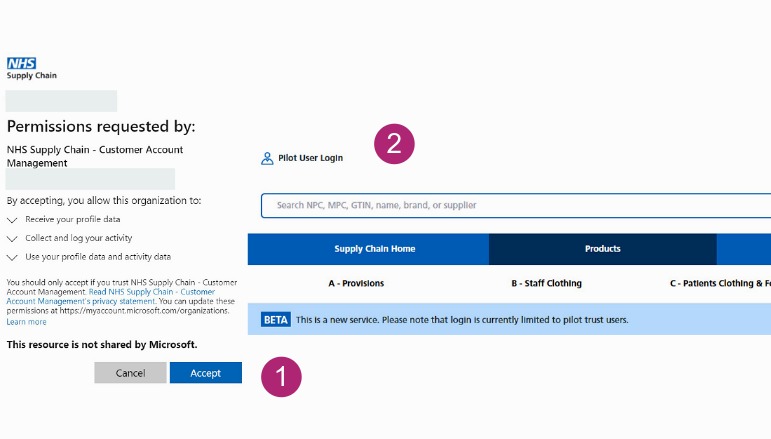
Select 'Accept' on the message box requesting permission.
You’ll then be taken to the catalogue home page. Click 'Pilot user login' – this should automatically log you in, allowing you to view prices and stock availability.
Once you've logged in for the first time, the system will remember you. There's no need to keep entering your ID or password.
To keep your user account safe, you may occasionally be required to use Multi Factor Authentication (MFA) when logging in. Most organisations already use MFA and this will work in the same way.
-
Select ‘Accept’ on the message box requesting permission - you’ll then be taken to the catalogue home page.
-
Click ‘Pilot user login’ – this should automatically log you in, allowing you to view prices and stock availability.